如果文章中有不准确的地方,欢迎留言指正。
Kitty#
安装#
brew install --cask kitty配置#
配置文件路径:~/.config/kitty/kitty.conf
font_family      font-maple-mono-nl-nf-cn
font_size        14.0

background_opacity 1
dynamic_background_opacity yes
window_padding_width 10

remember_window_size  no
initial_window_width  1000
initial_window_height 618

confirm_os_window_close 0
scrollback_lines 10000
enable_audio_bell no

allow_remote_control yes
copy_on_select yes
strip_trailing_spaces smart

tab_bar_edge bottom
tab_bar_style powerline
tab_powerline_style slanted
tab_title_template "{index}: {title}"

enabled_layouts splits
map cmd+d launch --location=hsplit
map cmd+r launch --location=vsplit
map cmd+w close_window

map cmd+left  neighboring_window left
map cmd+right neighboring_window right
map cmd+up    neighboring_window up
map cmd+down  neighboring_window down

map cmd+shift+left  resize_window narrower
map cmd+shift+right resize_window wider
map cmd+shift+up    resize_window taller
map cmd+shift+down  resize_window shorter

map cmd+t new_tab
map cmd+shift+[ previous_tab
map cmd+shift+] next_tab

map cmd+, edit_config_file
map cmd+ctrl+, load_config_file

include current-theme.conf
设置主题
kitty +kitten themesOh My Zsh#
安装#
先安装 Oh My Zsh:
sh -c "$(curl -fsSL https://raw.githubusercontent.com/ohmyzsh/ohmyzsh/master/tools/install.sh)"安装第三方插件:
git clone https://github.com/zsh-users/zsh-autosuggestions ${ZSH_CUSTOM:-~/.oh-my-zsh/custom}/plugins/zsh-autosuggestions
git clone https://github.com/zsh-users/zsh-syntax-highlighting.git ${ZSH_CUSTOM:-~/.oh-my-zsh/custom}/plugins/zsh-syntax-highlighting配置#
setopt no_nomatch

export ZSH="$HOME/.oh-my-zsh"
ZSH_THEME=""
plugins=(git last-working-dir extract brew zsh-autosuggestions zsh-syntax-highlighting)
source $ZSH/oh-my-zsh.sh

eval "$(starship init zsh)"git:提供大量 Git alias 和函数,减少重复输入。last-working-dir:记住上一次目录,新开终端自动回到最近工作目录。extract:统一用extract <文件>解压常见压缩格式。brew:提供 Homebrew 常用 alias,并自动处理 shellenv。zsh-autosuggestions:基于历史命令给出灰色自动补全建议。zsh-syntax-highlighting:命令输入时语法高亮,提前发现拼写/语法问题。
加载配置
source ~/.zshrcStarship#
安装#
brew install starship配置#
使用预置主题
starship preset pastel-powerline -o ~/.config/starship.toml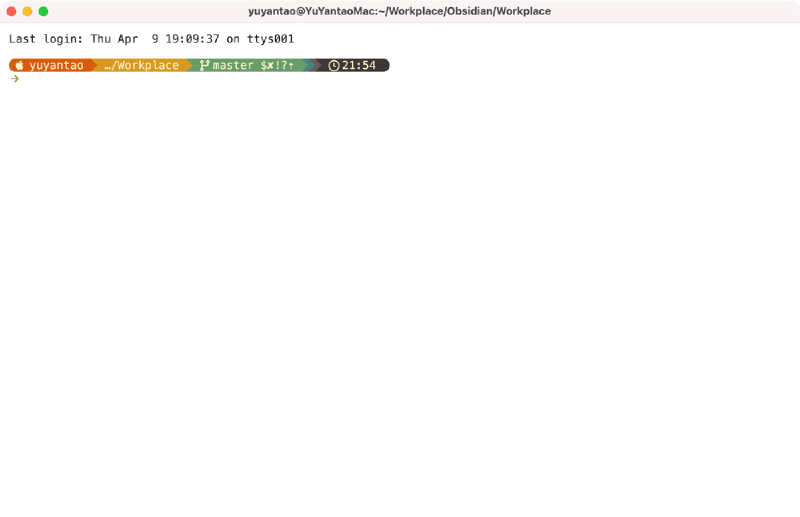
~/.config/starship.toml